واحة دبي للسيليكون, Dubai

Add to Quote
Brand
Cisco
Quantity
About Product
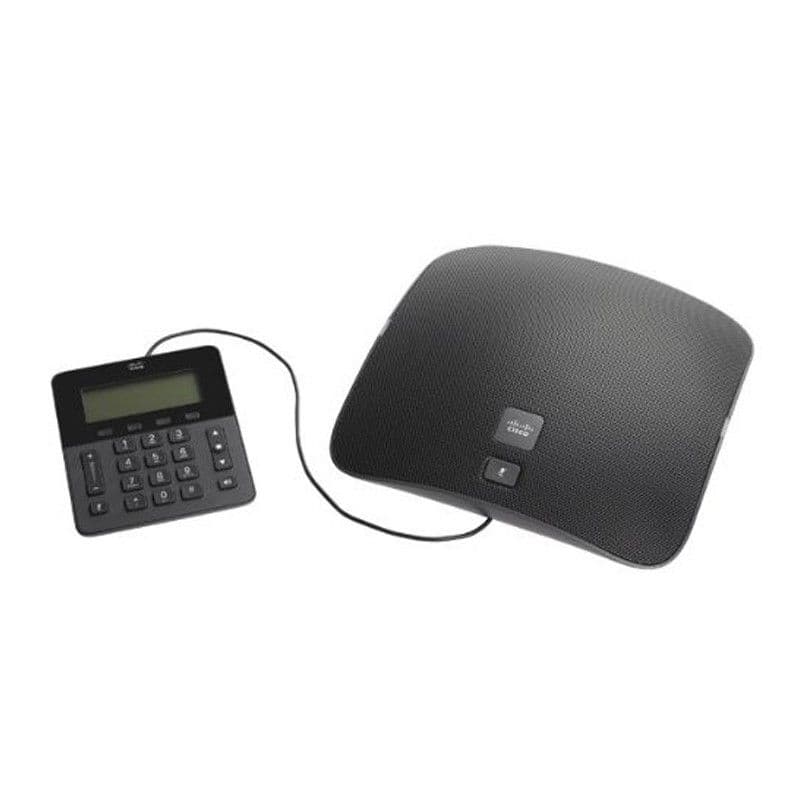
Cisco Unified IP Conference Phone 8831 base unit and control panel
CP-8831-K9= Specification
CP-8831-K9= Specification
Signaling protocol support
Session Initiation Protocol (SIP)
Codec support
G.711, G.729 (a and ab), G.722, and Internet Low Bitrate Codec (iLBC)
Calling feature support
+ Dialing (E.164)
Adjustable ringing and volume levels
Adjustable display brightness
Application launch pad
Auto-answer
Auto-detection of headset
Barge
Call forward
Call history lists
Call timer
Call waiting
Caller ID
Corporate directory
Conference
Direct transfer
Fast-dial service
Hold
Immediate divert
Join
Message-waiting indicator
Music on hold
Mute
Network profiles (automatic)
On- and off-network distinctive ringing
Personal directory
Predialing before sending
Privacy
Ring tone per line appearance
Shared line
Survivable Remote Site Telephony (SRST)
Time and date display
Transfer
Voicemail
Directories
The Cisco Unified IP Conference Phone 8831 identifies incoming messages and categorizes them for users on the screen. This feature allows you to quickly and effectively return calls using direct dial-back capability. The corporate directory integrates with the Lightweight Directory Access Protocol Version 3 (LDAPv3) standard directory.
Apps
The Apps soft key allows you to enter the Applications menu, where you are able to adjust display contrast, select background images (if available), and select from a large number of unique ringer sounds through the User Preference menu. Network configuration preferences also can be set up (usually by the system administrator). Configuration can be either automatically or manually set up for Dynamic Host Control Protocol (DHCP), Trivial File Transfer Protocol (TFTP), Cisco Unified Communications Manager, and backup Cisco Unified Communications Manager instances.
Help
The online Help feature gives you information about the phone keys, buttons, and features. The pixel display allows for more flexible feature navigation and significantly expands the information viewed when using features such as Services, Information, Messages, and Directory. For example, the Directory button can show local and server-based directory information.
Hold, Mute, and Redial keys
The Mute key is a fixed key. When it is active, the LED flashes on the Cisco Unified IP Conference Phone 8831 as well as on the optional wired and wireless microphone kits. Hold and Redial are provided as soft keys associated with the screen, and are always at the same position for easy access.
Wired control panel
The panel allows easy control of the unit and viewing of the display without having to move the entire unit.
Display
The conference station has a large high-resolution, graphical 3.5-inch backlit display (396 x 162 pixels).
Speakerphone
The Cisco Unified IP Conference Phone 8831 offers full-duplex high-quality wideband speakerphone technology. Included are Automatic Gain Control, comfort-noise generation, silence suppression and voice activity detection, Echo Suppression, and dynamic noise reduction, which reduces noise by up to 9 dB from constant noise sources such as fans or heating, ventilation, and air conditioning (HVAC) systems.
A two-way high-fidelity loudspeaker system provides superior speech clarity versus traditional conferencing systems.
Volume control
The convenient Volume Control buttons on Cisco Unified IP Conference Phone 8831 provide for easy, decibel-level adjustments for the speakerphone and ringer.
Quality-of-service (QoS) options
The Cisco Unified IP Conference Phone supports DHCP and 802.1Q/p standards. The conference station can also be configured with an 801.1Q VLAN header containing the VLAN ID overrides configured by the Admin VLAN ID.
Multiple ring tones
User-adjustable ring tones are available.
Security
The Cisco Unified IP Conference Phone 8831 supports device authentication through 802.1.x supplicant (TLS) and SRTP.
Language support
Arabic (Arabic Area)
Bulgarian (Bulgaria)
Catalan (Spain)
Chinese (China)
Chinese (Hong Kong)
Chinese (Taiwan)
Croatian (Croatia)
Czech (Czech Republic)
Danish (Denmark)
Dutch (Netherlands)
English (United Kingdom)
Estonian (Estonia)
French (France)
Finnish (Finland)
German (Germany)
Greek (Greece)
Hebrew (Israel)
Hungarian (Hungary)
Italian (Italy)
Japanese (Japan)
Latvian (Latvia)
Lithuanian (Lithuania)
Korean (Korea Republic)
Norwegian (Norway)
Polish (Poland)
Portuguese (Portugal)
Portuguese (Brazil)
Romanian (Romania)
Russian (Russian Federation)
Spanish (Columbia)
Spanish (Spain)
Slovak (Slovakia)
Swedish (Sweden)
Serbian (Republic of Serbia)
Serbian (Republic of Montenegro)
Slovenian (Slovenia)
Thai (Thailand)
Turkish (Turkey)
Configuration options
You can configure IP address assignment statically or through the DHCP client.
العلامات المتوفرة لدينا







Shopping cart
Your cart is curently empty
Let up help you find the perfect item
Show All Shop
Compare
Products
Your compare is curently empty

عمّ تبحث؟
عمليات بحث شائعة: