واحة دبي للسيليكون, Dubai

Add to Quote
Brand
Cisco
Quantity
About Product
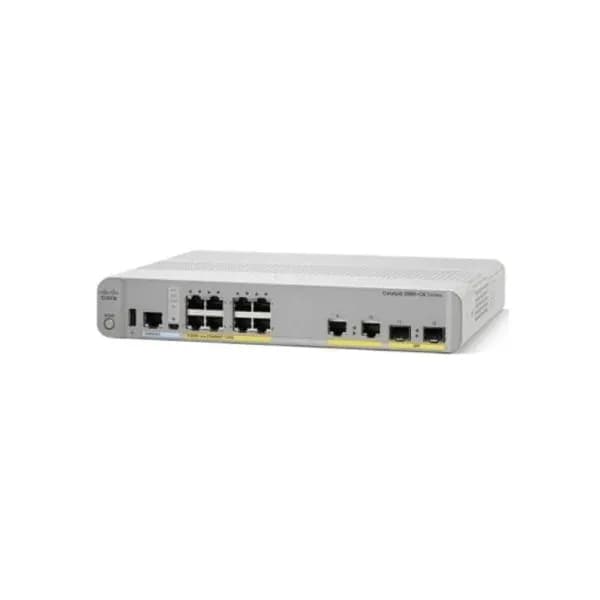
Cisco Catalyst 2960-CX 8 - port compact Switch Layer 2, POE+, 124W - 8 x 10/100/1000 Ethernet Ports, 2 SFP; 2GE uplinks- LAN Base - Managed
Cisco Catalyst 2960-CX 8 – port compact Switch Layer 2, POE+, 124W – 8 x 10/100/1000 Ethernet Ports, 2 SFP; 2GE uplinks- LAN Base – Managed
Model:
WS-C2960CX-8PC-L Cisco Compact Switch 2960CX
Brand:
Cisco
WS-C2960CX-8PC-L Overview
WS-C2960CX-8PC-L equips 8 Gigabit Ethernet POE+ ports with 2 x 1 Gigabit copper and 2 x 1 Gigabit SFP uplinks. The POE powers up to 30W/port and supplies total 124W POE budget which can power IP phones, IP Cam or other POE devices.
Quick Specs
Table 1 shows the Quick Specs.
Product Code
WS-C2960CX-8PC-L
Feature Set
LAN Base
Uplink Interfaces
2 x 1G copper plus 2 x 1G SFP
Ports
8 x 10/100/1000 Gigabit Ethernet ports
Available POE Power
124W
Forwarding Bandwidth
12 Gbps
Switching Bandwidth (full-duplex capacity)
24 Gbps
RAM
512 MB
Flash Memory
128 MB
Dimensions
4.44 x 26.9 x 23.8 cm
Package Weight
4.65 Kg
Product Details
Note:
?
Mode button
?
8 x 10/100/1000 ports
?
USB Type A port
?
2 x 1G copper
?
RJ-45 Console Port
?
SFP module slots
?
USB mini-Type B (console) port
?
LED Area
Table 2 shows the four LEDs descriptions.
LED
Color/Port Mode
Description
SYST
(System LED)
Off
System is not powered on.
Green
System is operating normally.
Amber
System is receiving power but is not operating properly.
STAT
Port status
The port status. This is the default mode.
SPEED
Port speed
The port operating speed: 10, 100, or 1000 Mb/s.
POE
Off
PoE is not enabled.
Green
PoE is enabled. Ports are functioning correctly.
Blinking Amber
-PoE mode is not selected
-At least one of the 10/100 or 10/100/100 PoE ports has been denied power
-At least one of the ports has a PoE fault
The console LEDs show which console port is in use.
If you connect a cable to a console port, the switch automatically uses that port for console communication. If you connect two console cables, the USB-mini console port has priority.
Table 3 shows the Console LED description.
LED
Color
Description
RJ-45 console port
Green
RJ-45 console port is active.
USB-mini console port LED is not active.
Off
Port is not active.
USB-mini console port is active.
USB-mini console port
Green
USB-mini console port is active.
RJ-45 console port LED is not active.
Off
Port is not active.
RJ-45 console port is active.
The Accessories
Table 4 shows some recommended cables.
Models
Descriptions
CAB-CONSOLE-USB
Cisco CAB-CONSOLE-USB Console Cable 6 ft with USB Type A and mini-B
CAB-CONSOLE-RJ45
Cisco CAB-CONSOLE-RJ45 Console Cable 6ft with RJ45 and DB9F
Compare to similar item
Models
WS-C2960CX-8PC-L
WS-C2960CX-8TC-L
Uplinks
2 x 1G copper or 2 x 1G SFP
2 x 1G copper or 2 x 1G SFP
Ports
8 x 10/100/1000 Gigabit Ethernet
8 x 10/100/1000 Gigabit Ethernet
Feature set
LAN Base
LAN Base
Available POE Power
124W
None
العلامات المتوفرة لدينا







Shopping cart
Your cart is curently empty
Let up help you find the perfect item
Show All Shop
Compare
Products
Your compare is curently empty

عمّ تبحث؟
عمليات بحث شائعة: